Optimize
Find unused tool schemas and remove them safely.
Press 5. Tool schemas are the biggest controllable line item in a request, because a
schema ships whether or not the tool is ever called — Claude needs the definition in context
before it can decide to use it.
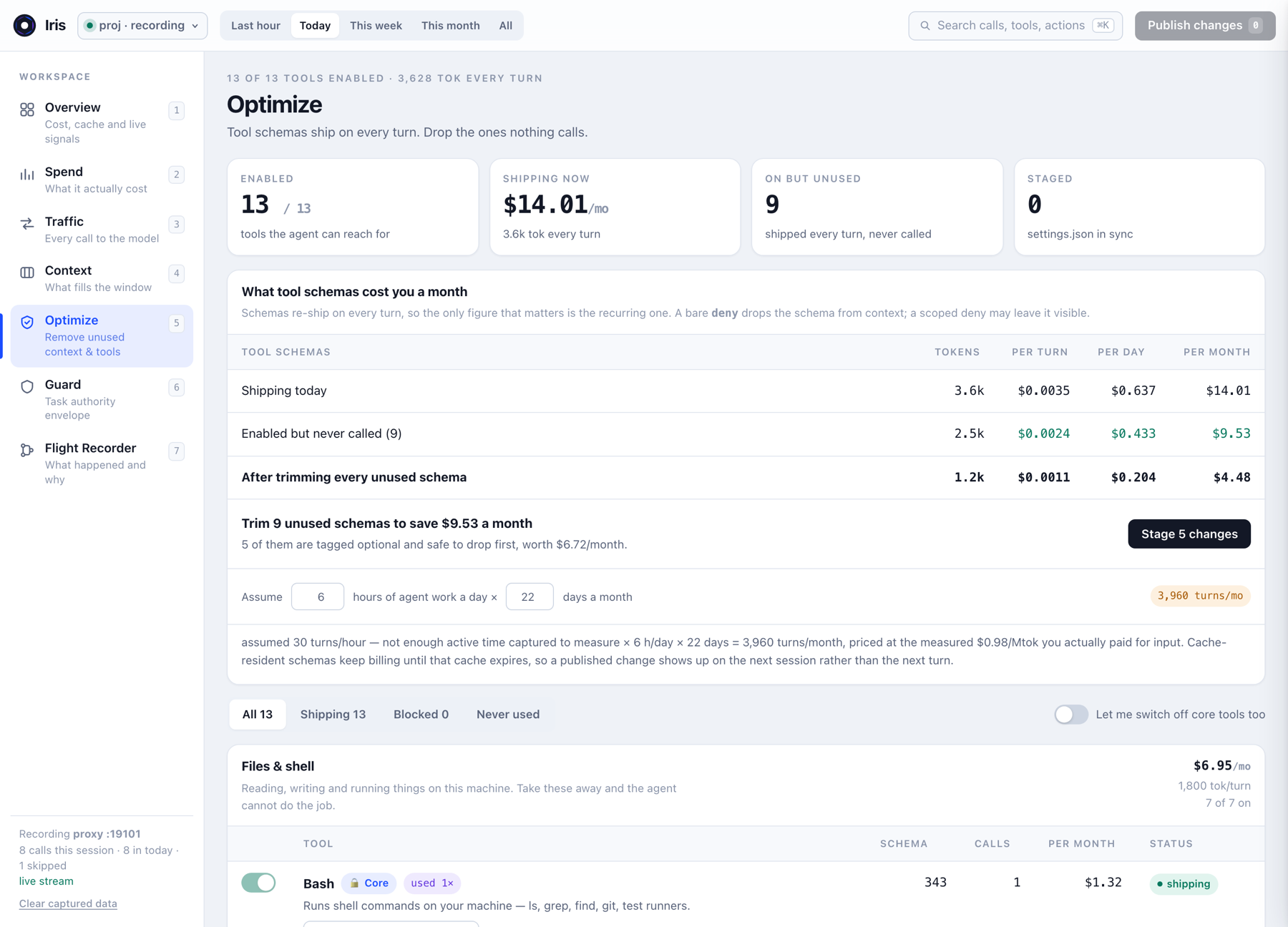
Optimize writes to permissions.deny in .claude/settings.json. Read
What not to disable before publishing anything.
What Iris counts as a tool
Anything that arrives in the request's tools[] array: Claude Code's built-in tools,
every tool exposed by a connected MCP server, and any tool added by a plugin. They are all just
schemas on the wire, and they all cost the same way.
How schema size is calculated
Iris serialises each tool definition and sizes it the same way it sizes everything else —
chars/4, then calibrated against the measured input total for that request. A schema's
size is dominated by its description text and the depth of its parameter object, which is why one
verbose MCP tool can outweigh five built-ins.
What "calls" means
The call count is how many times that tool appeared as a tool_use block in the
traffic Iris has recorded, within the selected time range. Two consequences worth knowing:
- A tool with 0 calls means Claude never reached for it in the traffic Iris saw — not that it is useless. A tool you use once a month still reads as 0 calls today.
- Optimize deliberately ignores the header time range and stays on the live inventory: what would ship on the next turn.
Staging and publishing
Toggling a tool off stages a change. Nothing is written to disk until you press Publish changes. This is deliberate — a deny list is a configuration change to your project, and it deserves a review step.
Publishing writes a bare tool name into permissions.deny:
{
  "permissions": {
    "deny": ["NotebookEdit", "mcp__canva__export_design"]
  }
}
Bare deny versus scoped deny
This distinction is the whole mechanism, and it is easy to get wrong by hand:
| Deny rule | Removes schema from context | Blocks execution |
|---|---|---|
"NotebookEdit" (bare name) | yes — the schema stops shipping | yes |
{ "tool": "Bash", "path": "…" } (scoped) | no — still in context | yes |
Only bare names shrink the payload, so Optimize only ever writes bare names. If what you want is "Claude may use this tool, but not there," that is a Guard rule, not a deny rule — see Guard.
Two things that are not immediate
- Claude Code applies the deny list on the next session, not the next turn. Restart it.
- A prefix already resident in cache keeps billing until its TTL expires. The saving shows up on the next fresh prefix, not instantly.
Re-enabling a tool
Toggle it back on in Optimize and publish, or delete its entry from permissions.deny
in .claude/settings.json by hand. Either way, restart Claude Code. Nothing about a trim
is irreversible, and init never wipes entries you added yourself.
What not to disable
Optimize protects tools tagged Core behind an explicit unlock. An agent without
Read, Edit and Bash cannot do the job it was asked to do, and
the failure mode is confusing rather than obvious — Claude simply becomes strangely incapable.
- Never for safety reasons. "Deny Bash so it cannot break anything" removes the schema from context and makes Claude unable to work, without giving you any control over what it does with the tools it still has. Use Guard for that.
- Be careful with rarely-used-but-critical tools. A 0-call count over one afternoon is weak evidence. Widen the time range first.
- MCP servers are the usual win. A server you connected for one task and left connected is typically the largest block of unused schema in the payload.