Open source · Runs on 127.0.0.1

Iris for Claude Code

See what Claude carries. Kill what you don't need. Control what it can do.

Iris runs locally between Claude Code and Anthropic. It shows what Claude Code sends with each request, identifies tool schemas taking up context, lets you remove the ones you don't use, and applies Guard rules before tools execute.

$ npx @zero-drift/iris

MIT licensed · Node 18+ · Nothing leaves your machine

One turn, drawn to scale7,225 tokens
System prompt 21.1%
Tool schemas 50.2%
Conversation 28.7%

5,149 of those tokens are the fixed prefix — the system prompt plus every tool schema, re-sent on every single turn of the session. Your own question is the tail end of that last slice. In this capture half the payload was tool definitions, and the model called almost none of them.

A look inside

What Iris shows you

Iris opens in your browser at 127.0.0.1:8787 while Claude Code runs as usual in your terminal. Every request Claude Code makes passes through it first, so everything below is your own traffic — four questions you cannot answer from the chat window.

127.0.0.1:8787 — Iris
Iris Overview: session cost, context shipped, unused-schema tax, Guard tallies
Overview — the first screen after a session's worth of work. Full screenshot ↗
  1. Context — what did that request carry?The most recent turn split into system prompt, tool schemas and conversation, each sized in tokens and priced.
  2. Optimize — does Claude need all of it?Every tool definition on the wire, with its token weight and how many times Claude actually called it.
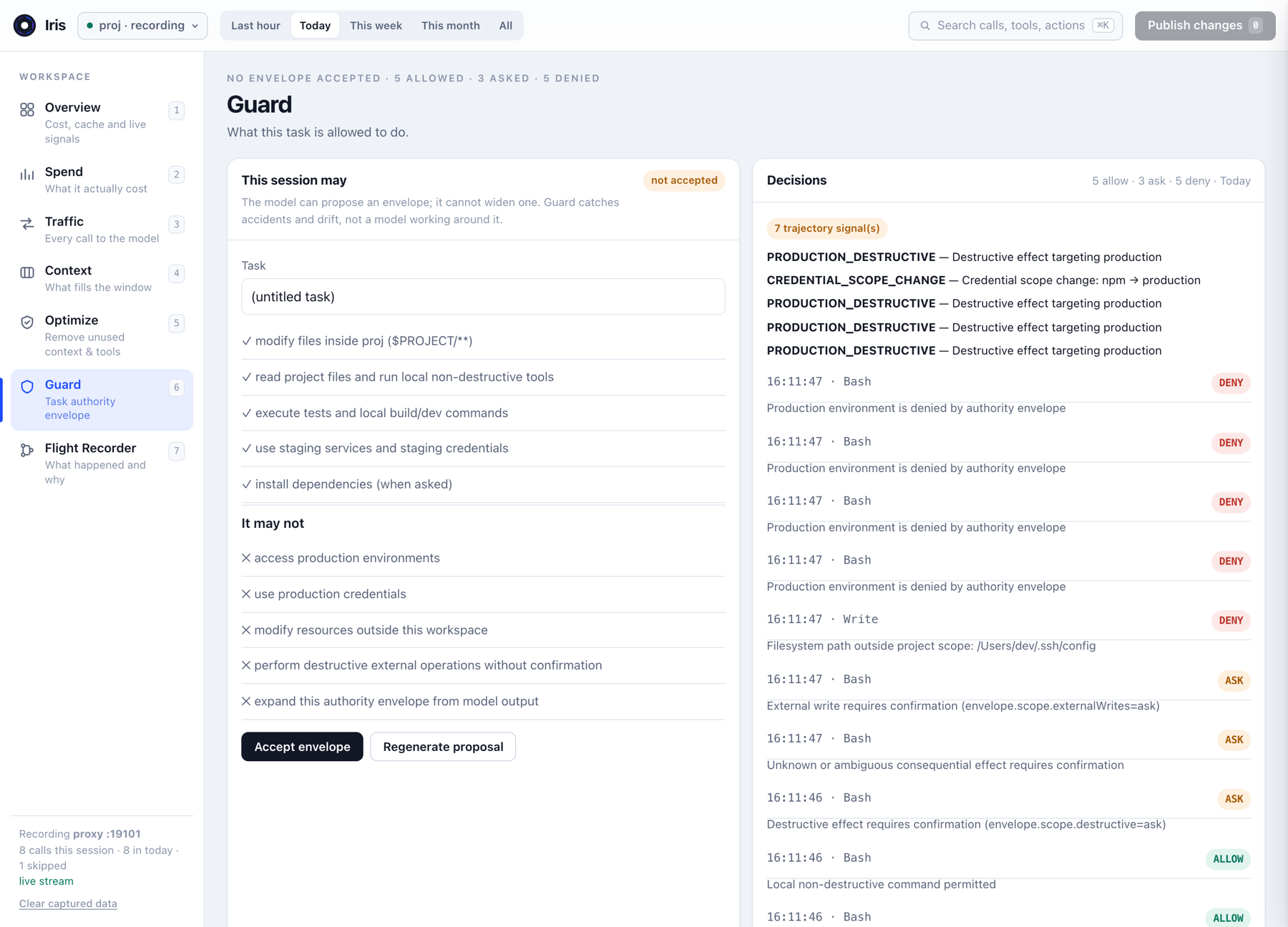
  3. Guard — should this action run?Allow, Ask or Deny, decided before the tool executes rather than reported afterwards.
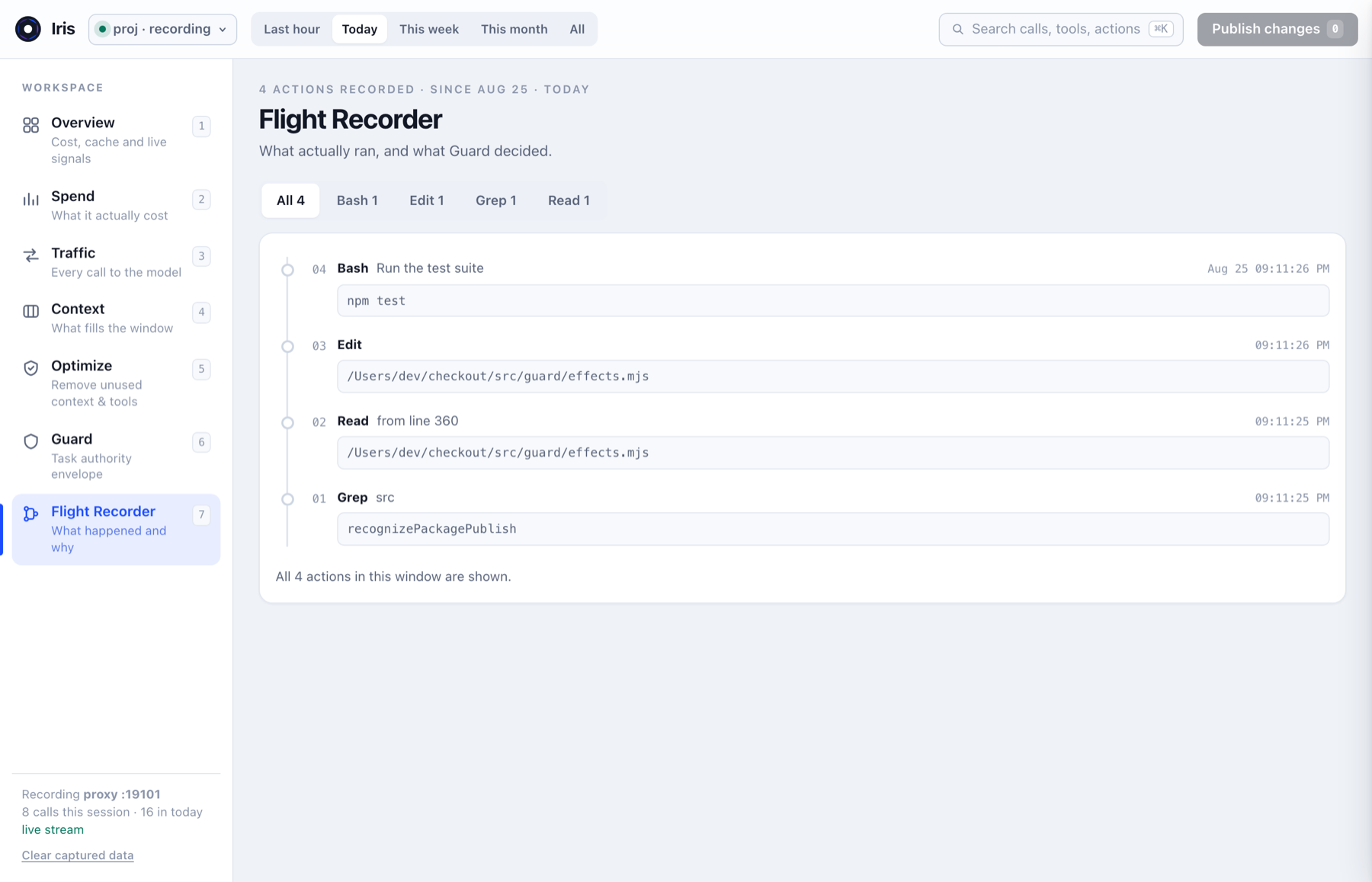
  4. Flight Recorder — what actually happened?Every call Claude made, in order, with the Guard decision attached to it.
01 — The evidence

What Claude carries before your prompt

Claude Code needs tool definitions in context so the model knows how to use them. That also means tools you never call can still occupy context on every request. Iris shows you which schemas are there, how large they are, and whether they are actually being used.

Beforemeasured

System prompt2.4k
System tools25.6k
Baseline28.0k

Afterunused tools removed

System prompt2.4k
System tools3.2k
Baseline5.6k
What this number is, and is not

Both figures come from Claude Code's own /context command on one setup — same project, same eight-message conversation, with only the tool schemas changed between the two captures. It is one measured setup, not a promised saving: what you can recover depends on which tools and MCP servers you have enabled, and how many of them you actually use. Iris is built to measure your configuration rather than to repeat this number.

Token counts start as chars/4 and are then calibrated against the measured input total that Anthropic returns, so the figures track what you were actually billed. Read the Token Tax research

02 — Optimize

Remove what never gets used

Iris keeps track of the tool schemas Claude Code sends and whether those tools are actually called. If an optional tool keeps consuming context without being used, you can turn it off and review the change before publishing.

Removing one tool, start to finish

NotebookEdit 1.7k tokens0 calls
{
  "permissions": {
    "deny": ["NotebookEdit"]
  }
}

What publishing actually does

Toggling a tool off stages the change. Nothing is written until you press Publish changes.
Iris only ever writes a bare tool name. A bare name removes the schema from context; a scoped rule blocks execution but leaves the schema on the wire.
Claude Code applies the deny list on the next session, and a prefix already resident in cache keeps billing until its TTL expires.
Core tools sit behind an explicit unlock. An agent without Read, Edit and Bash cannot do the job — use Guard for that instead.
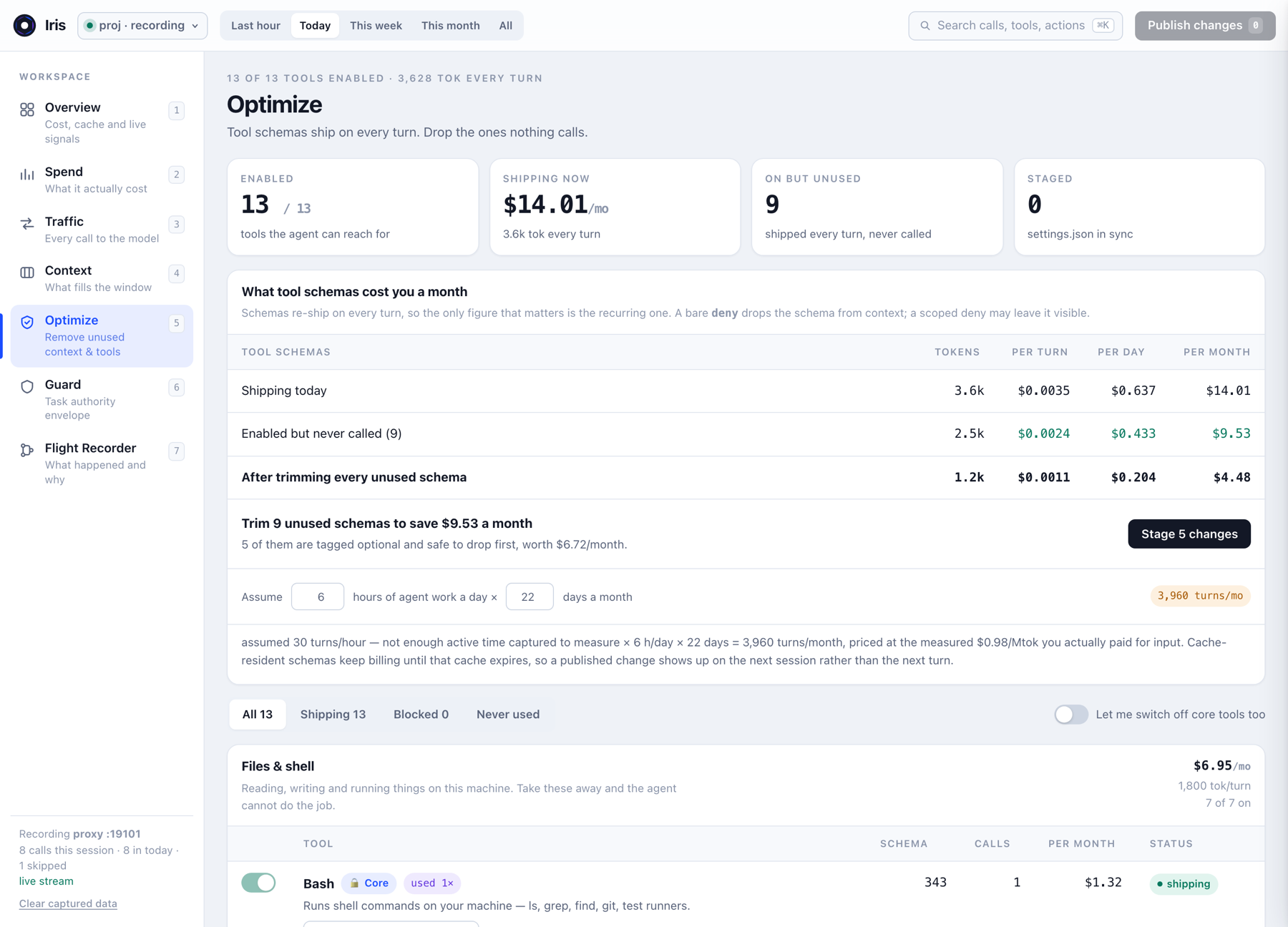
Optimize view: tool inventory with token weight and call count per schema
Optimize — tool inventory, sorted by never-called. Full screenshot ↗
03 — Guard

Control what Claude can do

Optimize decides what Claude can see. Guard decides what it can do. Claude may legitimately need a tool in context while still needing restrictions on how it is used — removing Bash from the payload is the wrong answer to "don't touch production".

Project files reads and writes inside $PROJECTALLOW
Local commands 58 known-safe inspection commandsALLOW
Destructive operations rm -rf ./build, irreversible effectsASK
Unknown commands anything no recognizer can classifyASK
Production prod environments and credentialsDENY
Outside project paths that resolve past the project rootDENY

How the decision is reached

Guard does not match on command text. It compiles the tool call into a structured effect — what it deletes, which service, which environment, whether it is reversible — and evaluates that against an authority envelope stored outside the conversation. The hook never asks a model; it is deterministic code.

// what does this actually DO?
{ effect: "delete", resourceType: "cloud",
  service: "aws", environment: "production",
  destructive: true, reversible: false,
  unknown: false }
  • Resolved path containment. Paths are resolved against the project root; outside means denied.
  • The envelope cannot expand itself. The model may propose an envelope; a proposal that grants more than the current one is rejected.
  • Missing or unreadable policy fails closed. It resolves to ASK or stricter — never a silent allow.
  • Decisions are deterministic and logged. Same call, same envelope, same answer — written to the ledger every time.
What Guard is not

Guard is not a sandbox. Arbitrary shell commands cannot always be understood safely. Unknown operations can require confirmation, and Guard should not be the only boundary protecting irreversible infrastructure.

Guard view: authority envelope and the decision ledger
Guard — the rules this session is working under, and every decision they produced. Full screenshot ↗
04 — Flight Recorder

What actually ran

Flight Recorder shows what Claude actually invoked during the session and the Guard decision attached to it.

12:41:02Read src/guard/policy.mjsALLOW
12:41:04Grep -rn TODO srcALLOW
12:41:08Bash npm testALLOW
12:41:16Write ~/.ssh/configASK
12:41:21Bash aws s3 rm s3://acme-prod-assets --recursiveDENY

Context, Optimize and Flight Recorder are one story told in order: Iris measures what went out, shows which of it was never used, and records what Claude was allowed to do with the rest.

What was sentWhat ships unusedWhat ran
Flight Recorder: every tool call in order with its Guard decision
Flight Recorder — the session as a ledger, not a transcript. Full screenshot ↗
Claude Code
your terminal
Iris
127.0.0.1:8787
Anthropic
api.anthropic.com
05 — Where your traffic goes

It never leaves your machine

Iris runs locally and binds to 127.0.0.1. Claude Code sends its model requests through Iris, which forwards them to Anthropic.

  • Requests stay byte-identical upstream unless wire redaction is explicitly enabled.
  • Guard runs through Claude Code hooks rather than modifying model requests.
  • Logs are scrubbed at rest by default — 14 credential patterns, plus emails, replaced with stable hashes.
  • No extra model call. Guard is deterministic code, not an LLM.
MIT licensed · Local-first · Source on GitHub

Read the security page

06 — Install

Running in about a minute

Requires Node 18+, Claude Code, and an Anthropic account Claude Code can already use.

Start Iris

Leave this terminal running. It is both the proxy and the dashboard, and Claude Code reaches the API through it while you work.

$npx @zero-drift/iris

Initialize the project

From the Claude Code project that has a .claude/ directory.

$npx @zero-drift/iris init

Open Iris, restart Claude Code, work normally

Open http://127.0.0.1:8787, restart Claude Code so it picks up the new settings, then use Claude the way you already do. Come back after a few turns and read Context, Optimize and Guard.

07 — Questions

Before you install

The things people ask before putting a proxy in front of their model traffic.

Does Iris send my code or prompts anywhere?

No. Iris binds to 127.0.0.1 and runs entirely on your machine. It forwards requests to Anthropic byte-for-byte unless you explicitly enable wire redaction, and it makes no model calls of its own. There is no account, no telemetry and no remote component.

How much context can I actually recover?

One measured setup went from a 28,000-token baseline to 5,600 — a reduction of 22,400 tokens on every turn. That is one measurement, not a promise. How much you can recover depends on which tools and MCP servers you have enabled and how many you actually use, which is what Iris measures for your own configuration.

Does Iris slow Claude Code down?

It adds one local proxy hop on the same machine. Guard runs as a Claude Code hook and is deterministic code rather than a model call, so a policy decision costs no tokens and no round trip to an API.

What happens if Iris is not running?

Claude Code cannot reach the API, because iris init points ANTHROPIC_BASE_URL at localhost. Start Iris and it works again, or remove that variable from .claude/settings.json to go back to talking to Anthropic directly.

Is Guard a sandbox?

No. Guard evaluates tool calls before Claude Code executes them, and it is strongest on filesystem scope and production access. It does not confine a process or restrict syscalls, and it should not be the only boundary between an agent and irreversible infrastructure.

Does it work with MCP servers?

Yes. MCP tool schemas arrive in the same tools array as built-in tools, so Iris sizes them, counts their calls, and can remove them from context the same way. For many setups an unused MCP server is the single largest block of wasted schema.

Will removing a tool break Claude Code?

It can, which is why core tools sit behind an explicit unlock. An agent without Read, Edit and Bash cannot do the work. Removing a tool is fully reversible: toggle it back on and publish, or delete its entry from permissions.deny, then restart Claude Code.

Does Iris cost anything?

No. Iris is MIT licensed and free, with no account and no paid tier. It has zero runtime dependencies and runs on Node 18 or newer.

Can I use it on more than one project?

Yes. One instance serves one project. Start a second instance in another project and it finds a free port, then re-points that project's settings at the port it actually bound.