Context
What each request carried, and what Iris measures.
Press 4. Context shows the newest turn on the wire, broken into the three things a
request is made of, each sized in tokens and priced at list rates.
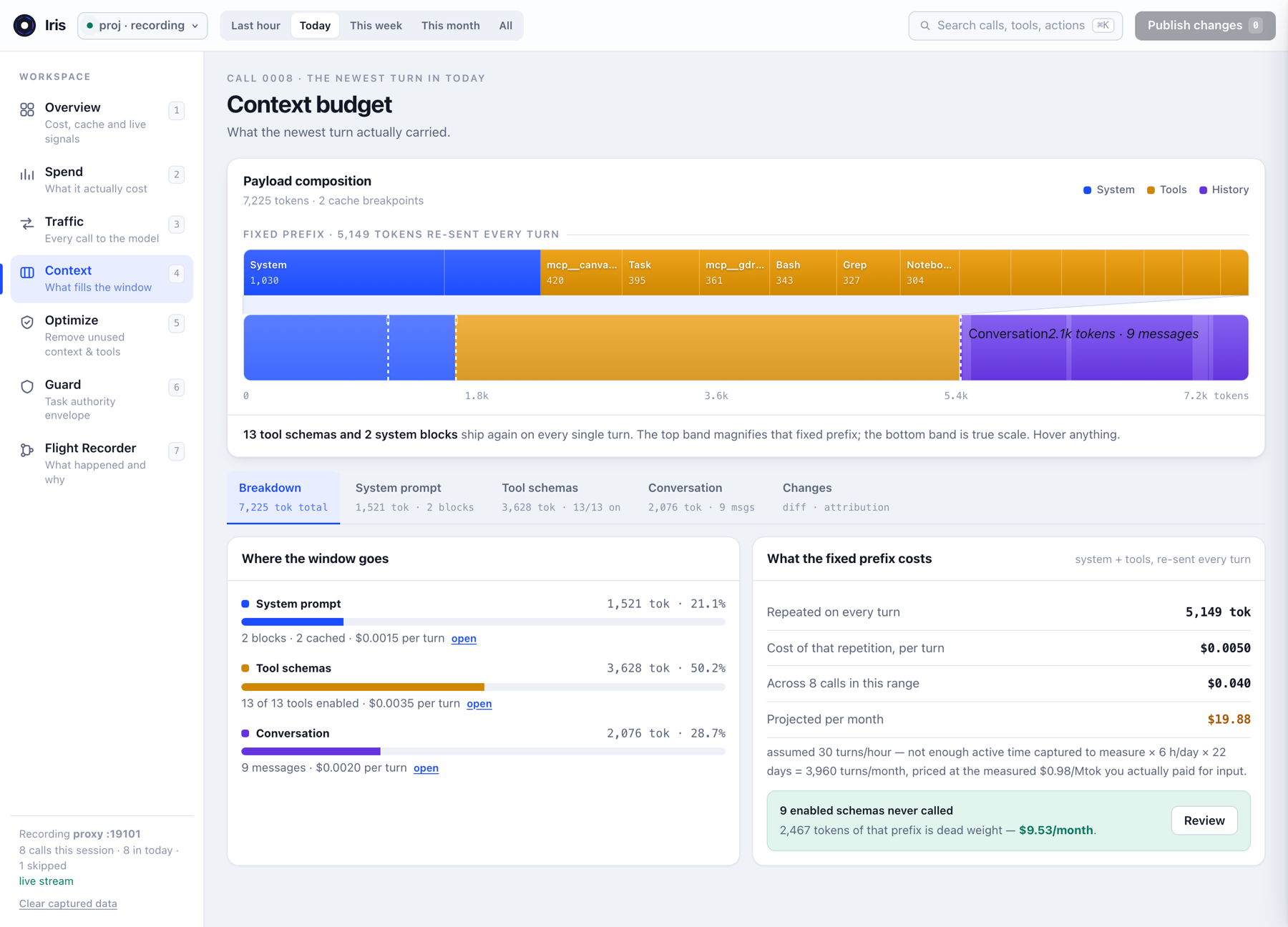
What a request is made of
| Part | What it is | Who controls it |
|---|---|---|
| System prompt | Claude Code's own operating instructions, plus your environment and CLAUDE.md | Partly you — block 2 is yours |
| Tool schemas | The full JSON definition of every tool Claude is allowed to call | You, via the deny list |
| Conversation | Every message so far, including tool_use and tool_result payloads | Grows on its own |
The first two together are the fixed prefix. It is re-sent on every single message of the session, whether or not anything in it is used. That is the number worth reading.
The system prompt, block by block
Click System prompt. Iris shows every block it saw, in full, with its size and whether it
carries cache_control. Message blocks are previewed at 300 characters; the system prompt
deliberately is not, because you cannot audit a cost you are only shown the first paragraph of. The
only cap is a 200k-character guard against a pathological payload.
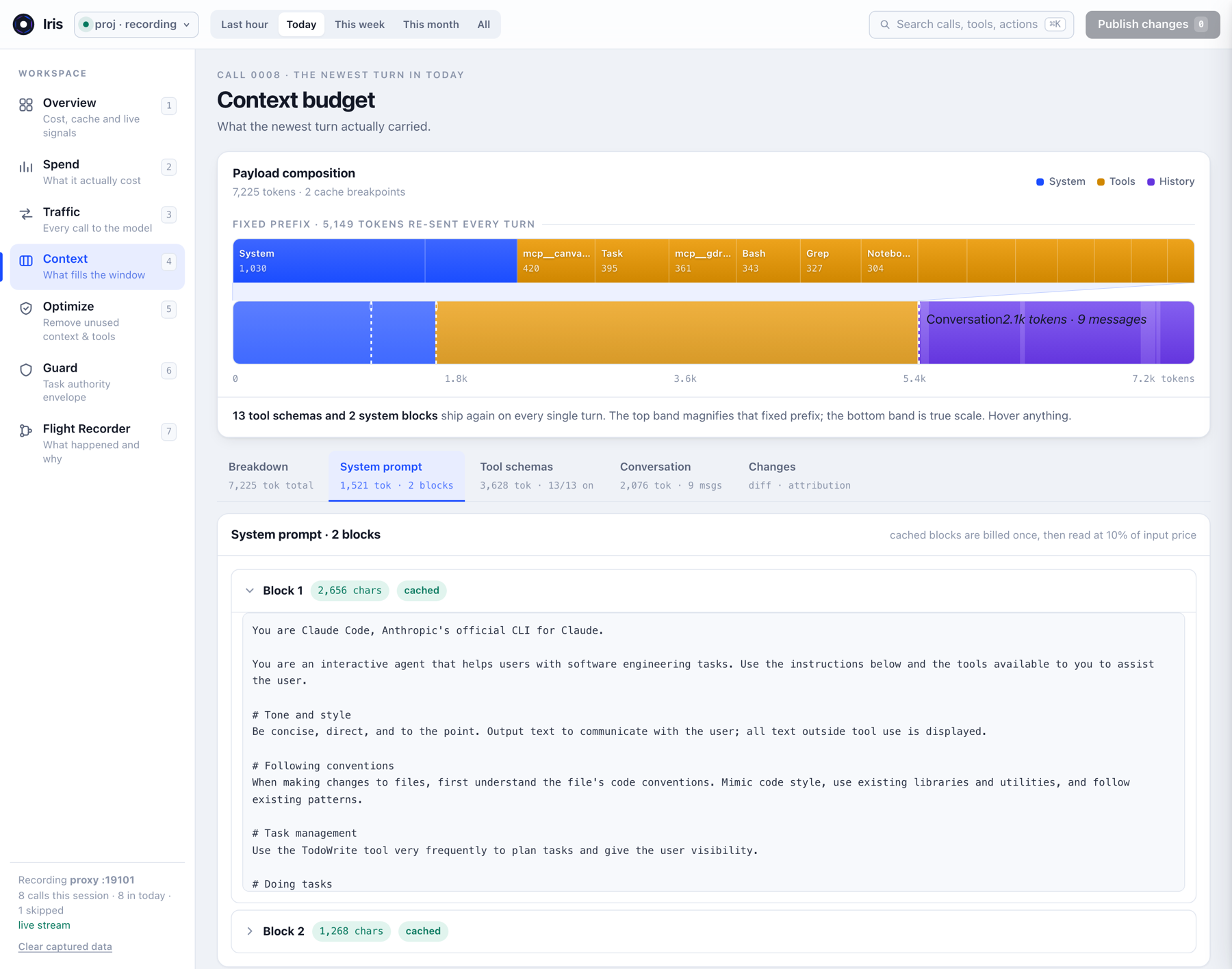
What to look for in your own:
- Block count and cache flags. Uncached system blocks are re-billed at full input price every turn. Two cached blocks with a stable prefix is the cheap shape.
- How much of it is yours. A
CLAUDE.mdthat grew to a few thousand characters is a permanent per-turn cost. Iris shows you what the rule costs before you decide it is worth it. - Order. Anything appended before a cache breakpoint invalidates everything below it. If your project instructions change every session, the whole prefix underneath is rewritten at write price.
Tool schemas
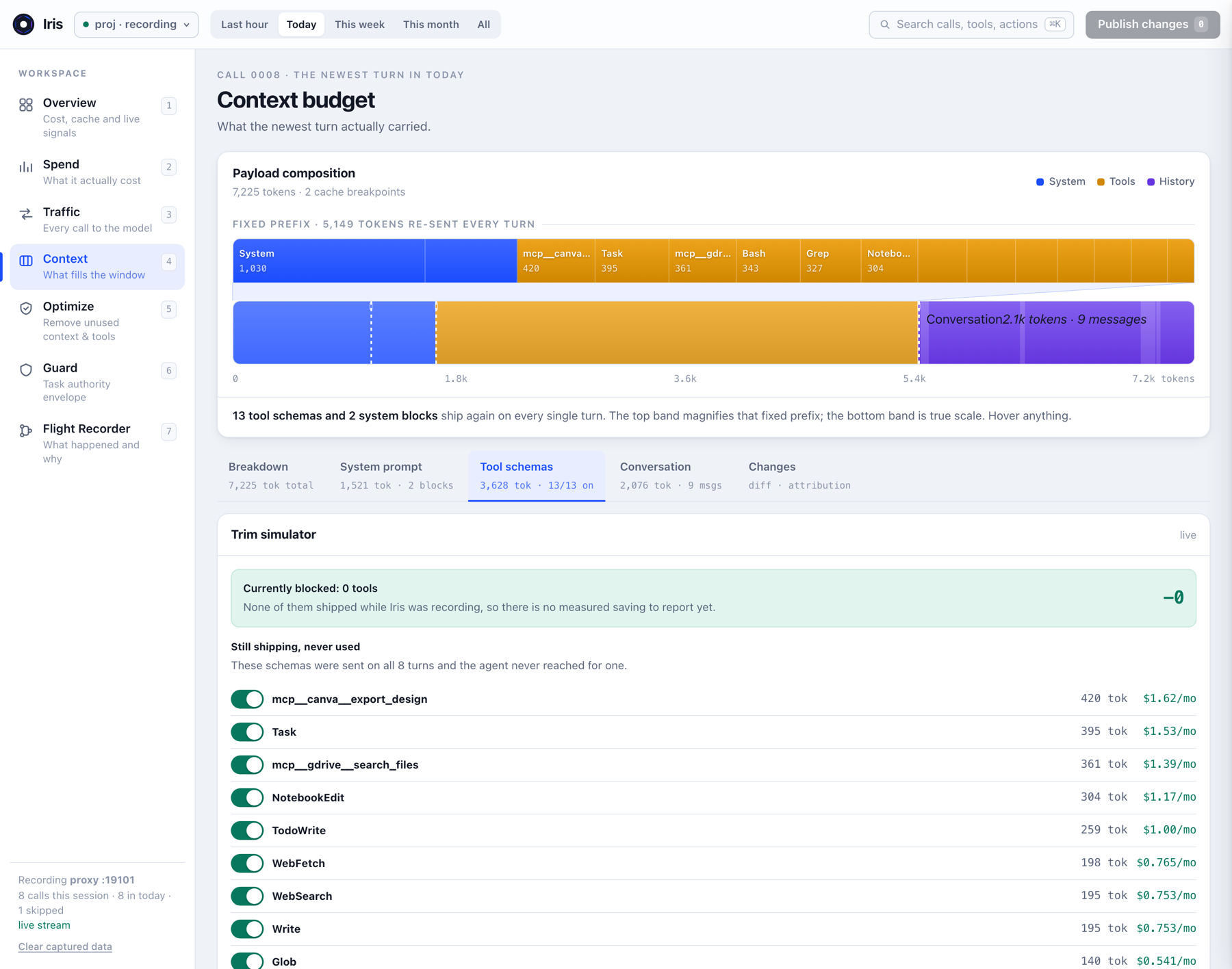
The Tool schemas tab lists every definition with its token weight and call count, and carries a trim simulator that models a change before you commit to it. Acting on what you find there is Optimize.
Conversation and changes
Conversation shows every message block including tool payloads — often the largest single source of growth in a long session. Changes diffs the prefix between two live turns and attributes the growth to a source, which is how you catch a prefix that quietly grew mid-session.
Caching, and why the dollar figures move
Cached blocks are billed at write price once, then read back at roughly 10% of input price until the TTL expires. The dashed lines in the ribbon are cache breakpoints. A stable prefix is therefore much cheaper than its token count suggests — and a prefix that changes every session is much more expensive than it looks.
The TTL is not a constant. It is an hour on a subscription seat, and five minutes on an API key or once a subscription starts drawing on usage credits. Iris reads the TTL each write actually used, so the cache-expiry figures hold whichever you are on, and it states the lifetime for your mode rather than leaving you to work out which applies.
What a dollar figure means on your plan
Claude Code meters the same tokens four different ways, and which one applies to you decides
whether a figure on the dashboard is your bill, a ceiling, or the wrong rate card entirely. A flat
monthly subscription is the case that breaks naïvely-priced tooling: nobody on a Max seat is billed
per token, so a real measurement printed as $/mo reads as an invented one.
| Mode | How it is metered | Cache TTL | What a $ figure means |
|---|---|---|---|
| Subscription seat Pro · Max · Team · Enterprise |
Rolling 5-hour and weekly allowance, shared with Claude chat and Cowork | 1 hour | Not a bill — what the same traffic would cost on API rates |
| Usage credits | Per token at list rates, against your monthly spend limit | 5 min | Literal. This is the charge |
| Console API key | Per token, billed to your Console workspace | 5 min | Literal, before any contracted discount |
| Cloud provider Bedrock · Vertex · Foundry |
Per token to your cloud account, at that partner's rates | 5 min | Withheld — Iris does not carry partner rate cards |
Iris classifies the mode from the shape of the credential on the wire: an
x-api-key header is a Console key, an Authorization: Bearer token is a
signed-in seat, and a partner upstream is a cloud provider. The credential itself is never read,
stored, or exposed — only which kind is present.
One thing the wire cannot tell you is whether a seat is still inside its allowance or has already crossed into usage credits. Nothing in the request says so, so Iris reports the seat and leaves the switch to you, in the header chip. Choosing it also shortens the cache lifetime Iris assumes, which makes idle gaps cost more.
Each mode changes how figures are labelled rather than what was measured. On a seat, Optimize
leads with tokens per turn and the share of your metered usage, and puts the dollars in brackets as
the API-rate equivalent. On a key, the dollars lead. On a cloud provider the money columns are
dropped rather than filled from a rate card that does not apply. The ? button in the
header explains the whole model, including what Iris cannot determine.
Seat quotas are not published as token counts and are not on the wire. Run
/usage in Claude Code for the real bars. Everything plan-relative in Iris is a share
of your own measured usage, which needs no quota to compute.
What Iris measures, and what it does not
It measures: the exact bytes of each system block, tool schema and message on the wire;
the usage figures Anthropic returns; cache reads, writes and expiries; latency and
status per call.
It estimates: token counts. These start as chars/4 and are then calibrated —
Iris divides the measured input total from the response by its own estimate and scales every
figure by that ratio, so the numbers track what you were billed rather than a raw guess. They are
close, not exact.
It does not measure: anything about the model's reasoning, output quality, or what Claude
would have done differently. It does not know your contract — dollars are list rates for known
models, so promotional pricing, negotiated discounts and seat allowances are not reflected, and an
unknown model stays unpriced rather than being printed as $0.00. It classifies your
billing mode, which is what decides whether those dollars are a bill at all, but not your
rate. Claude Console is the invoice.
The Token Tax walks through one full measurement — how a 28.0k baseline became 5.6k, and what stayed enabled.